Free demo
Download Transientik Master
The full plugin, free to try. A voice notice rides the master until you activate your licence: it waits a few seconds before the first announcement so you can A/B in peace, then repeats about once a minute at a reduced level, always within the limiter ceiling. The processed track itself always stays on target, and the licensed version has no voice at all.
Preparing your download…
Video tutorials
Watch the setup, start to finish.
Install on Windows
Install the Transientik Master VST3 on Windows 10/11 in three minutes: download, one file to copy, one rescan.
Install on Mac
Download and install Transientik Master on macOS: VST3 and AU, ready to try in demo mode in your DAW. Activation is explained in the video.
Master a track in GarageBand
From a raw mix export to a finished master using only free tools: GarageBand plus the free Transientik Master demo. Analysis first, then one decision, then A/B. What you hear is what you bounce.
The videos are hosted on YouTube in privacy-enhanced mode. Nothing loads from Google until you press play. Details in the Cookie Policy.
Get started
Up and running in three steps.
Download
Install
Transientik Master.vst3 into C:\Program Files\Common Files\VST3\.macOS - copy the .vst3 to /Library/Audio/Plug-Ins/VST3/ and the .component to .../Components/.Copying into a system folder may trigger a standard OS security prompt. Allow it to continue.Restart your DAW or rescan plugins.Activate
System requirements
- Platforms
- Win 10/11 - macOS 11.0+
- Formats
- VST3 - AU
- Engine
- Deterministic
- Licence
- Up to 3 machines
Quick start
Master a track in six steps.
- 01
Press Start Analysis
Hit the big START ANALYSIS button to arm the guided mastering wizard. The plugin is now waiting for audio.
- 02
Play your track from the top
Rewind and press play in your DAW. Let the whole song play through once: Transientik Master listens to the full track and analyses spectrum, dynamics, transients, stereo balance and section consistency across every part (intro, verse, chorus, breakdown, outro). The pass ends on its own when playback stops. Some hosts (WaveLab, Audacity and Reaper among them) do not expose the transport in a way the plugin can follow: there, open Options, turn on Ignore DAW Transport, and start and stop the pass by hand with START NOW and STOP ANALYSIS. See the first FAQ below.
- 03
Pick a destination
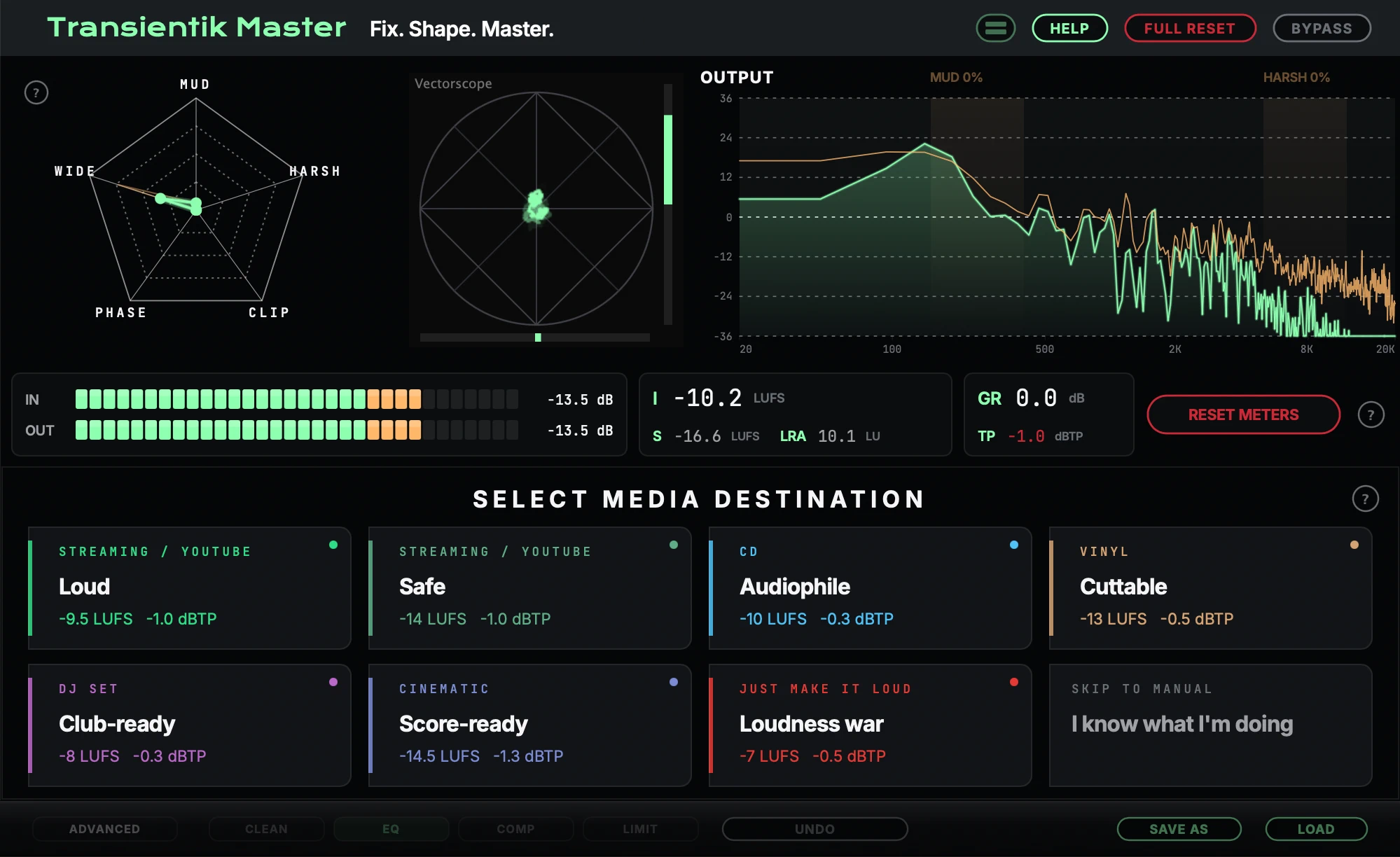
Choose where the song is going. Each tile is a loudness target and processing profile (Streaming Loud, Streaming Safe, CD, Vinyl, DJ Set, Cinematic, Just Make It Loud). The colour stripe shows the preset's energy, and the LED lights up once selected.
- 04
Switch destinations in real time
The tile grid stays compact. Click any other tile to re-resolve against the same analysis instantly, with no second listening pass. Open READ TRACK ANALYSIS for a per-metric breakdown, or PROCEED TO FINE TUNING when you have found the one.
- 05
Fine-tune
The FINE-TUNE menu offers 12 directions (Louder, Smoother, Warmer Bass, Brighter Top, Wider Stereo, More Presence...) at three intensities. Tap a pill to nudge the master that way. Go BACK TO DESTINATION SELECTION any time without losing the analysis.
- 06
Apply the final master
Hit APPLY FINAL MASTER when it sounds right. The Done band then gives you four ways to keep working: ANALYSIS RESULTS (the full reasoning trace), SAVE AS PRESET (a .tcp file), DESTINATION SELECTION, or FINE TUNING.
FAQ
Frequently asked questions
The analysis never starts (or stops too early) in WaveLab, Audacity or Reaper
Some hosts drive the transport in ways the plugin cannot follow, so the listening pass never arms or ends before the track is done. Since v1.2.0 you can make the pass fully manual: open Options and turn on Ignore DAW Transport. START NOW begins the analysis, STOP ANALYSIS ends it, and the host transport and any mid-track silence are ignored. This is also the right mode for material with long silent gaps.
The EQ graph shows a much wider range than I can actually adjust. Is that a bug?
No, it is by design. The vertical axis spans +/-36 dB so the EQ curve and the live spectrum overlay share the same scale, but each EQ band is intentionally capped at +/-12 dB. Transientik Master is a mastering tool: corrections should stay gentle, and boosts or cuts beyond 12 dB on a full mix almost always do more harm than good. If a band seems to need more than that, the fix usually belongs upstream in the mix.
Is the free demo limited?
The demo is the full plugin: every module, every feature, no time limit. The only difference is a voiceover watermark on the output until a license is activated. When you buy, you activate the same build you already installed: no reinstall, your settings stay.
How do I activate my license?
Your purchase email contains an activation code in the form TKM-XXXX-XXXX-XXXX. Open the plugin, enter the email you bought with and the code, and you are done. One license covers up to 3 of your own computers. If you cannot find your code, write to support@transientik.com.
Activation fails with a network error, or nothing seems to reach the server
Activation is one short, secure connection from the plugin to transientik.com, and it runs inside your DAW. Some antivirus and firewall suites silently block DAWs and plugins from reaching the internet, so the attempt never leaves your computer. If activation keeps failing, add your DAW to your antivirus or firewall allow list (or pause its web shield for a minute, activate, then turn it back on) and try again. After that single connection the plugin works offline as usual. Still stuck? Write to support@transientik.com and we will sort it out.
The plugin was activated, but later it asks me to activate again
This is almost always a system cleanup utility. Your license is stored in the plugin's settings folder (macOS: ~/Library/Application Support/Transientik Labs/Master, Windows: %APPDATA%\Transientik Labs\Master), and some cleaner apps delete that folder when they tidy up the disk, taking the license and your presets with it. Add that folder to your cleanup tool's exclusion list, then activate again with the same email and code. Re-activating the same computer does not use up an extra seat of your license.
Does the plugin need an internet connection or an account?
Audio processing is 100% local: no cloud, no account, nothing leaves your machine. You only need one brief internet connection, to activate the license. From v1.3.0 that activation is permanent: no re-validation, no offline time limit, no reconnect prompts. You can work fully offline for as long as you like.
My track is longer than a few minutes. Does the analysis cover all of it?
Yes. Since v1.2.0 the listening pass has no length cap: the whole material is analyzed end to end, in fixed memory, so full album sides and DJ sets are characterized from the first second to the last.
Which DAWs and formats are supported?
Transientik Master ships as VST3 for Windows and macOS, plus AU for macOS. Practically every modern DAW is covered, including GarageBand via AU (see the video tutorial on this page). There is no AAX or standalone version at the moment. Full system requirements are listed above.
I bought the plugin but lost my download link
Your purchase email contains a personal download link; check your spam folder for a message from Transientik Labs. If it is gone, write to support@transientik.com and we will resend it. And if the plugin is not for you, every purchase comes with a 14-day no-questions refund.
Changelog
~/transientik $ cat CHANGELOG.md
# follow the white rabbit down the transient hole
## v1.4.0v1.4.0
2026-07-17New - Zoom the interface. The Options panel (gear icon) has a new Zoom row: "+" and "-" scale the whole plugin window in 15% steps, RESET returns it to the automatic size. The window never goes below the size the plugin picks for your screen. The zoom level is remembered on this machine and applies to every project, adapting to whatever screen and DAW the plugin opens in. - Compressor DRY/WET. A new global mix slider on the COMP tab (top right, next to BYPASS COMP) blends the entire compressor section, all 3 bands plus the bus compressor, from 0% (compressor absent) to 100% (full compression). Great for parallel-compression style mastering: dial the full setting in, then back the slider off to taste. Defaults to 100%; the wizard and RESET TO AUTO keep it there. - Longer attack and release times. Compressor attack now reaches 300 ms and release 750 ms on all bands (LOW, MID, HIGH, BUS); limiter release now reaches 300 ms. Auto and wizard results are unchanged: the extra headroom is for manual fine-tuning only. - Help updates. The EQ guide now documents the double-click precision editor and the right-click node menu; the quick-start guide describes all four Options panel preferences (including Zoom), each on its own titled row. Note for projects with recorded automation - If a saved project has DAW automation lanes recorded on a compressor attack/release or limiter release knob, the host stores those lanes as a percentage of the knob range. With the wider ranges the same lane now plays back higher millisecond values than when it was recorded (a comp attack lane at the halfway point used to mean about 50 ms and now means about 75 ms). Re-record or rescale those lanes after updating. Saved knob positions without automation lanes recall exactly as before.
## v1.3.0v1.3.0
2026-07-14New
- Activation is now permanent. Once the plugin is activated it stays active forever: no re-validation, no 30-day offline limit. Work fully offline for as long as you like; the plugin never asks you to reconnect.
- Type exact EQ values. Double-click any EQ band node to open a small editor next to it and type the frequency and gain precisely. Values are clamped to each band's range, comma decimals work ("2,4"), and "k" / "kHz" suffixes are accepted ("2.4k" = 2400 Hz).
- Right-click menu on EQ nodes. Right-click a band node for "Input manual values" and "Reset point to Auto". Resetting a point to the wizard's value now lives here (it was double-click before); the item is available when the node shows its white ghost dot.## v1.2.0v1.2.0
2026-07-11New
- Ignore DAW Transport (Options panel). The analysis pass becomes fully manual: START NOW begins it, STOP ANALYSIS ends it, and the host transport and mid-track silence are ignored. Built for hosts with unusual transport behavior (e.g. WaveLab) and for material with silent gaps. Turning it on keeps "Stay on main interface during analysis" ON.
- Unlimited analysis length. The listening pass no longer stops sampling after 4 minutes: capture now spans the whole material at a gradually coarser resolution, in fixed memory. Long tracks and DJ sets are characterized end to end (this also refines results for any track over 4 minutes in normal transport mode).
- Smarter preset saving. The save dialog now knows what you mean: SAVE updates the current preset in place (no overwrite prompts), SAVE AS appears when you type a new name and creates a copy, and +1 saves the next numbered version in one click ("My preset 1" -> "My preset 2") for track-history workflows. The current preset is remembered with your DAW project, and loading a preset makes it the current one.
- Preset list is sorted in natural order ("Name" -> "Name 1" -> "Name 2" -> "Name 10").
Fixed
- Dialogs (help, confirmations, save/load, update notice) can no longer sit hidden behind the plugin window while silently blocking clicks, and any open dialog closes automatically the moment an analysis pass starts, so the STOP ANALYSIS button is always reachable.
- The update notification no longer appears during an analysis pass; it shows afterwards.
- Preset names are cleaned of characters that are invalid in file names.
- Assorted UI polish: save dialog layout and text sizes, SAVE/LOAD pill widths, updated help texts.## v1.1.0v1.1.0
2026-07-03Demo voice, retuned: - The notice now starts 10 to 20 seconds into playback, so you can A/B in peace. - Notices repeat every 45 to 75 seconds instead of every 6 to 15. - Voice level lowered by about 8 dB. - The voice is now capped at the limiter ceiling: host meters no longer show peaks above your target while it speaks. Licensed versions: no audible changes. Small licensing and stability improvements under the hood. Thanks to the producers who told us the old demo voice made proper evaluation impossible. You were right.
## v1.0.0v1.0
2026-06-30Transientik Master Genesis
~/transientik $